Showing posts with label Maintenance. Show all posts

Tuesday, 8 September 2015

How to ensure security log is running after SAP service restart

Scenario: The SM20 audit log was not activated after SAP service restart and require to startup manually.


Solutions:

A) Turn on the audit log every time the SAP started
1) Execute tcode: SM19 -> Click Edit -> Click save to enable the audit log


2) Test the SM20 to determine activities been capture


B) Set the profile parameter: rsau/enable = 1
1) Execute tcode: SM19  - > Click Environment -> Click Profile Parameter -> Check the value of "rsau/enable" parameter whether been set to 1 (0 = audit is not activated, 1 = audit is activated)


2)  If the current value = 0 change the value to = 1 using tcode: RZ10

3) Test the SM20 after SAP service restart  to determine activities been capture


References: SAP security log

Monday, 30 March 2015

Authorization: User been granted with additional roles unintentionally

Scenario:
During "SM20" audit log review, encounter user was granted with additional access. Ex: user suppose to only have display access for certain tcode but end up with write access etc.

Initial Findings: 
1) Review the problematic user role and profile assignment (Found:composite roles were assigned)
     Aware on the "Validity From" (23.03.2015)

2) Double click any of the roles (in blue) which assigned from composites role to view the role details in "PFCG"

3) Checked on the last modified date/time


4) Use "SUIM" to further track down the role changes (Change Documents -> For Users)


5) Enter the afected user ID, Changed by and date according to the details in step 1 (PFCG) and select the roles tab accordingly.

6) The result clearly shown that there are 76 of roles been added into the affected user

7) Further review the daily schedule job: PFCG_DEPENDENCY_TIME (Based on experience the background job that perform daily maintenance on all the role/profile for all the user)
     - Enter the relevant job name, user and date.

8) Select "Job log"

9) Some activities happen on all the composites role and single role that found assigned to the problematic user

10) Another alternative is to use "sm20" to trace/view all the changes perform by the PFCG_TIME_DEPENDENCY (Enter the relevant user and date/time)


11) Sample of users that been process by the "PFCG_TIME_DEPENDENCY" batch job
      Observe the creation date/time of program: RHAUTUPD_NEW and the user that been changed


12) Continue investigation by executing "SE16N" to view the correct role name that assigned to user (Z_Audit_Finance) and found child roles attach to it.


13) Review the role that suppose to assign (Z_Audit_Finance) in "PFCG" which showing it was a single role instead of composite role


How to simulate the issue:
1) Assigned the same role to a new test user

2) Wait for the schedule job execution to be complete (PFCG_DEPENDENCY_TIME) or execute tcode: PFUD to perform the similar maintenance task


3) Unwanted roles been assigned

Conclusion: Composite roles been assigned to user unintentionally after batch job execution.

Solution:
1) Apply SAP Note: 1987850
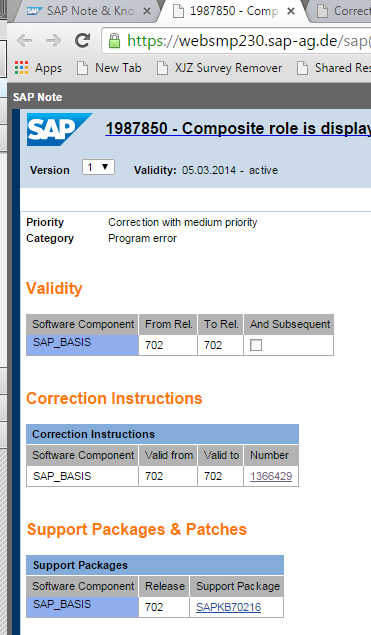


or

2) Delete all the roles in the affected user, clone the affected role into a new single role name and reassign to the user. Observe after the schedule job complete (PFCG_DEPENDENCY_TIME) and the user should no longer be assign with unwanted roles.


Thursday, 11 December 2014

SAP GUI connection to SAP system in cloud without using SAPRouter

Scenario:
Alternative solution to access SAP system that install in the Cloud VM without using SAPRouter.

Error:
1) Getting connection error while trying to connect to the SAP system located in the cloud.

Solution:
Example of Microsoft Azure Cloud: 

1) Enable the port:3200 on the endpoint page.

2) Add the outbound and inbound rules in VM firewall.

3) Retry the SAP GUI login, it should be fine by now.

Additional Info on ports used:


(Refer from: SDN page)


Sunday, 7 December 2014

Resolve Oracle SQLPlus Login Error

Scenario:
When trying login to Oracle database encounter error: ORA-12560.


Solution:
Method 1: Ensure Environment Variables: "ORACLE_SID" been set correctly.

Method 2: Ensure Oracle Service and Listener are running.
(OracleServiceSID and OracleSID11203TNSListener)
If the services already started, restart the services and retry the login again.


Wednesday, 3 December 2014

How to resolve missing TR files during transportation

Scenario:
Administrator encounter error during transporting of TR where the files been deleted or remove due to various reason (ex: files been deleted during system house-keeping)

Error:

1) Sample error occur during transport.

2) Transport details.

3) Further details on the transport error.

Solution:

1) Example of using HP Data Protector to restore the missing TR files.
    The TR files locate in: "/usr/sap/trans/cofiles" and "/usr/sap/trans/data"


2) Restore the required "cofiles" files.

4) restore the required "data" files.

5) Once the required files been restore, ensure the correct "owner and group" properties be configure.
     - /usr/sap/trans/cofiles
     - chown prdadm/qasadm *.DEV
     - chgrp sapsys *.DEV

6) Perform the same configuration on "owner and group" for data files.
     - /usr/sap/trans/data

7) Redo the transport and it should be working by now...